Intro
kubernetes 1.26에서 Dynamic Resource Allocation with Structured Parameters 이라는 새로운 기능으로 소개됐다.
간단하게 요약하면 현재 kubelet device plugin을 통해 노드에 붙은 리소스를 컨테이너가 사용가능하도록 할 수 있게 됐지만, 다음 제약사항이 있다.
Info
다음 KEP-4381 문서[1]에서 자세히 확인할 수 있다.
- device initialization 워크로드가 뜰 때, 워크로드에 필요한 device 선택이 불가능함 (원하는 설정/속성 등..)
- device cleanup 워크로드가 종료된 후, device 설정을 정리하고 싶지만 지원하지 않음. 워크로드가 중단된 후(post-stop), 작업이 현재 지원되지 않음
- partial allocation 워크로드가 device의 일부분만 사용하고 싶은 경우, 현재 지원되지 않아 사전에 파티셔닝을 하거나 전체 device를 지정해야함.
- optional allocation 워크로드가 soft 조건의 optional device 요청은 지원하지 않음. - (device가 없는경우?에 대한 로직)
- support over the fabric device 현재에는 device-plugin에서 pod가 스케쥴링된 노드에 위치한 device만 사용한 가능한 구조라서 device 레벨에서 리소스를 사용할 수 없다.
device plugin에서의 제약사항을 보면 매우 불편하다. 따라서 해당 기능은 1.34에서 GA 됐고 기본적으로 enable 되었다.
그럼 nvidia dra를 기준으로 어떤식으로 사용되는지 확인해보자.
Installation
다음 공식 문서 [2]에 설치 방법이 매우 친절하게 설명되어있다. helm으로 간단하게 설치할 수 있다.
helm repo add nvidia https://helm.ngc.nvidia.com/nvidia \
    && helm repo update

helm install nvidia-dra-driver-gpu nvidia/nvidia-dra-driver-gpu \
    --version="25.3.0-rc.5" \
    --create-namespace \
    --namespace nvidia-dra-driver-gpu \
    --set resources.gpus.enabled=true
    --set gpuResourcesEnabledOverride=true
nvidir dra driver는 GPUs 와 ComputingDomains를 리소스 유형을 지원한다. 각각 리소스 유형을 좀 더 살펴보자.
ComputingDomains NVLink를 위한 추상화 계층으로 현재 공식 지원한다.
GPUs
DRA를 통해 GPU할당을 위한 기능으로, 아직 공식지원되지는 않는다.
일반적으로 사용하는 spec.containers.resources.limits 필드에 nvidia.com/gpu 를 기입하는 것에 대응하는 DRA를 통해 GPU를 사용할 수 있는 기능이다.
공식문서에도 기본적으로 resources.gpus.enabled=false 을 설정하도록 되어있지만 한번 설정해보도록한다.
위 driver를 설치하면, 다음과 같이 deviceclass가 설치된다.
➜ kubectl get deviceclass
NAME                                        AGE
compute-domain-daemon.nvidia.com            3d4h
compute-domain-default-channel.nvidia.com   3d4h
gpu.nvidia.com                              3d4h
mig.nvidia.com                              3d4h
Usage
ResourceClaimTemplate 과 해당 template을 사용하는 Pod 를 생성한다.
➜ kubectl apply -f - <<EOF
apiVersion: resource.k8s.io/v1beta1
kind: ResourceClaimTemplate
metadata:
  name: single-gpu
spec:
  spec:
    devices:
      requests:
      - name: gpu
        deviceClassName: gpu.nvidia.com
---
apiVersion: v1
kind: Pod
metadata:
  name: pod
  labels:
    app: pod
spec:
  containers:
  - name: ctr0
    image: ubuntu:22.04
    command: ["bash", "-c"]
    args: ["nvidia-smi -L; trap 'exit 0' TERM; sleep 9999 & wait"]
    resources:
      claims:
      - name: shared-gpu
  - name: ctr1
    image: ubuntu:22.04
    command: ["bash", "-c"]
    args: ["nvidia-smi -L; trap 'exit 0' TERM; sleep 9999 & wait"]
    resources:
      claims:
      - name: shared-gpu
  resourceClaims:
  - name: shared-gpu
    resourceClaimTemplateName: single-gpu
  tolerations:
  - key: "nvidia.com/gpu"
    operator: "Exists"
    effect: "NoSchedule"
➜ EOF
resourceclaimtemplate.resource.k8s.io/single-gpu created
pod/pod created
이후 ResourceClaimTemplates 생성되는 ResourceClaims를 확인할 수 있다.
➜ kubectl describe resourceclaims
Name:         pod-shared-gpu-wzqz2
Namespace:    default
Labels:       <none>
Annotations:  resource.kubernetes.io/pod-claim-name: shared-gpu
API Version:  resource.k8s.io/v1
Kind:         ResourceClaim
Metadata:
  Creation Timestamp:  2025-11-03T06:32:21Z
  Finalizers:
    resource.kubernetes.io/delete-protection
  Generate Name:  pod-shared-gpu-
  Owner References:
    API Version:           v1
    Block Owner Deletion:  true
    Controller:            true
    Kind:                  Pod
    Name:                  pod
    UID:                   3c47435a-90b8-4865-9f49-e387aa04045f
  Resource Version:        14688020
  UID:                     03af2998-ae62-4f8b-821a-a5a9202f1a34
Spec:
  Devices:
    Requests:
      Exactly:
        Allocation Mode:    ExactCount
        Count:              1
        Device Class Name:  gpu.nvidia.com
      Name:                 gpu
Status:
  Allocation:
    Devices:
      Results:
        Device:   gpu-0
        Driver:   gpu.nvidia.com
        Pool:     ip-10-0-174-59.ap-northeast-2.compute.internal
        Request:  gpu
    Node Selector:
      Node Selector Terms:
        Match Fields:
          Key:       metadata.name
          Operator:  In
          Values:
            ip-10-0-174-59.ap-northeast-2.compute.internal
  Reserved For:
    Name:      pod
    Resource:  pods
    UID:       3c47435a-90b8-4865-9f49-e387aa04045f
Events:        <none>
생성된 pod의 로그를 보면, pod에서 참조하는 container가 같은 GPU를 참조하는 것을 볼 수 있다.
➜ kubectl logs pod --all-containers --prefix
[pod/pod/ctr0] GPU 0: Tesla T4 (UUID: GPU-54b063d1-49b7-1dbd-6955-a99b6139260f)
[pod/pod/ctr1] GPU 0: Tesla T4 (UUID: GPU-54b063d1-49b7-1dbd-6955-a99b6139260f)
만일 아래와 같이 기존에 사용하는 것처럼, 각 컨테이너마다 1개의 GPU 할당을 요청하게 된다면 총 2개의 GPU가 필요하게되고, 조건에 따라 정상적으로 스케쥴링이 되지 않거나 필요이상의 GPU가 사용될 수 있다.
apiVersion: v1
kind: Pod
metadata:
  name: pod-static
  labels:
    app: pod-static
spec:
  containers:
  - name: ctr0
    image: ubuntu:22.04
    command: ["bash", "-c"]
    args: ["nvidia-smi -L; trap 'exit 0' TERM; sleep 9999 & wait"]
    resources:
      limits:
        nvidia.com/gpu: 1
  - name: ctr1
    image: ubuntu:22.04
    command: ["bash", "-c"]
    args: ["nvidia-smi -L; trap 'exit 0' TERM; sleep 9999 & wait"]
    resources:
      limits:
        nvidia.com/gpu: 1
  tolerations:
  - key: "nvidia.com/gpu"
    operator: "Exists"
    effect: "NoSchedule"
만일 Pod간 같은 GPU를 공유하고 싶으면 ResourceClaim을 직접 생성해서 사용하면 된다.
apiVersion: resource.k8s.io/v1beta1
kind: ResourceClaim
metadata:
  name: inter-pod-shared-gpu
spec:
  devices:
    requests:
    - name: gpu
      deviceClassName: gpu.nvidia.com
---
apiVersion: v1
kind: Pod
metadata:
  name: pod-1
  labels:
    app: pod-1
spec:
  containers:
  - name: ctr0
    image: ubuntu:22.04
    command: ["bash", "-c"]
    args: ["nvidia-smi -L; trap 'exit 0' TERM; sleep 9999 & wait"]
    resources:
      claims:
      - name: shared-gpu
  resourceClaims:
  - name: shared-gpu
    resourceClaimName: inter-pod-shared-gpu
  tolerations:
  - key: "nvidia.com/gpu"
    operator: "Exists"
    effect: "NoSchedule"
---
apiVersion: v1
kind: Pod
metadata:
  name: pod-2
  labels:
    app: pod-2
spec:
  containers:
  - name: ctr0
    image: ubuntu:22.04
    command: ["bash", "-c"]
    args: ["nvidia-smi -L; trap 'exit 0' TERM; sleep 9999 & wait"]
    resources:
      claims:
      - name: shared-gpu
  resourceClaims:
  - name: shared-gpu
    resourceClaimName: inter-pod-shared-gpu
  tolerations:
  - key: "nvidia.com/gpu"
    operator: "Exists"
    effect: "NoSchedule"
➜ kubectl logs pod-1
GPU 0: Tesla T4 (UUID: GPU-54b063d1-49b7-1dbd-6955-a99b6139260f)
➜ kubectl logs pod-2
GPU 0: Tesla T4 (UUID: GPU-54b063d1-49b7-1dbd-6955-a99b6139260f)
ResourceClaim에 device 속성에 따라 어떤 gpu를 선택할지, cel expression으로 나타낼 수 있다. ResourceSlice 객체의 동일한 deviceClassName
apiVersion: resource.k8s.io/v1beta1
kind: ResourceClaim
metadata:
  name: inter-pod-shared-gpu
spec:
  devices:
    requests:
    - name: gpu
      deviceClassName: gpu.nvidia.com
      selectors:
      - cel:
          expression: |
            device.attributes["gpu.nvidia.com"].cudaComputeCapability.isGreaterThan(semver("7.0.0"))
아래 처럼 cuda version, uuid, driver version, capacity를 적절히 선택할 수 있다.
➜ kubectl get resourceslice | grep "gpu.nvidia.com"
ip-10-0-138-116.ap-northeast-2.compute.internal-gpu.nvidia565lp   ip-10-0-138-116.ap-northeast-2.compute.internal   gpu.nvidia.com              ip-10-0-138-116.ap-northeast-2.compute.internal   6h7m
ip-10-0-151-116.ap-northeast-2.compute.internal-gpu.nvidia8g44p   ip-10-0-151-116.ap-northeast-2.compute.internal   gpu.nvidia.com              ip-10-0-151-116.ap-northeast-2.compute.internal   6h6m
ip-10-0-174-59.ap-northeast-2.compute.internal-gpu.nvidia.cfvjt   ip-10-0-174-59.ap-northeast-2.compute.internal    gpu.nvidia.com              ip-10-0-174-59.ap-northeast-2.compute.internal    6h7m

➜ kubectl get resourceslice ip-10-0-138-116.ap-northeast-2.compute.internal-gpu.nvidia565lp -oyaml
...
spec:
  devices:
  - attributes:
      architecture:
        string: Turing
      brand:
        string: Nvidia
      cudaComputeCapability:
        version: 7.5.0
      cudaDriverVersion:
        version: 13.0.0
      driverVersion:
        version: 580.95.5
      pcieBusID:
        string: 0000:00:1e.0
      productName:
        string: Tesla T4
      resource.kubernetes.io/pcieRoot:
        string: pci0000:00
      type:
        string: gpu
      uuid:
        string: GPU-1a5dc02e-a83d-07a2-d195-9c2ea91a50e0
    capacity:
      memory:
        value: 15Gi
...
이때, cudaComputeCapability, driverVersion 등 값을 보면 version : 7.5.0이라고 되어있다. 이는 semver 객체로, 실제로 cel expression 작성시 이런식으로 작성하면 된다. [3] 이부분 헷갈려서 코드도 좀 찾아봤고 [4]에서 좀 더 자세한 예시를 확인해볼 수 있었다.
device.attributes["gpu.nvidia.com"].cudaComputeCapability.isGreaterThan(semver("7.0.0"))
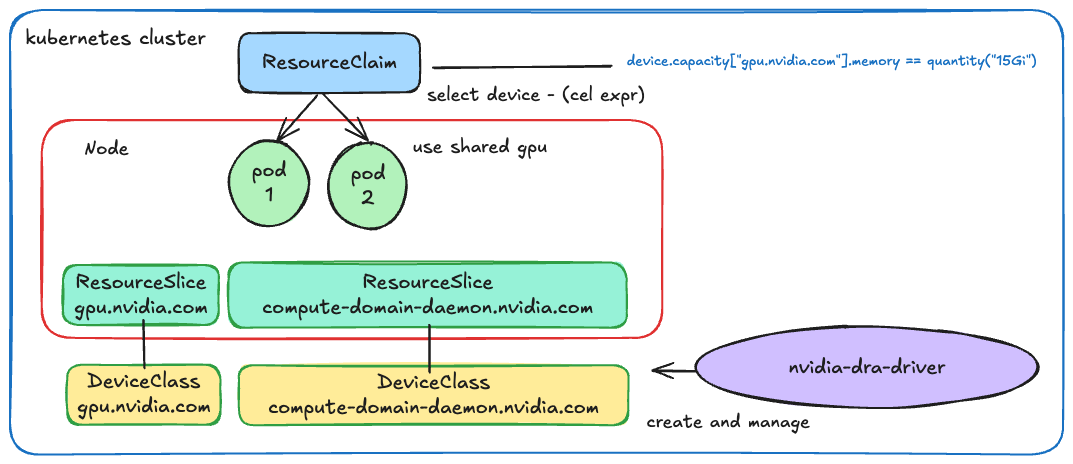
간단하게 DRA에서 사용되는 전체 리소스를 다음과 같이 그려봤다. (대단하신 나의 미적감각..)
참고자료
[2] https://docs.nvidia.com/datacenter/cloud-native/gpu-operator/latest/dra-intro-install.html
[3] https://kubernetes.io/docs/reference/using-api/cel/#kubernetes-semver-library